Your organization has 12 MCP servers in production. Three teams built them independently. Auth is fragmented, and there is no central registry. Identifying every tool exposed to your AI agents requires a manual audit across teams. This is the current state at most enterprises adopting the Model Context Protocol.
MCP server integration solves the initial problem by providing LLMs with structured access to enterprise systems via a single standard protocol. Over time, the ecosystem has matured quickly. Microsoft, Atlassian, and major IDE vendors now ship native MCP client support. The protocol itself is production-grade.
The challenge now is operational scale. Multiple teams, AI hosts, and environments all depend on MCP as a shared integration layer. Reliable function at this level requires governed patterns, observability, and production-grade operations.
This article covers the integration patterns, common failure modes, and production readiness criteria that platform teams need.
MCP Server Integration Has Outgrown the Pilot Phase
MCP server integration has shifted from developer tooling curiosity to the enterprise integration plane.
- Microsoft ships MCP support across Azure API Management, GitHub Copilot, and VS Code agent mode.
- Atlassian runs a production remote MCP server for Jira and Confluence.
- JetBrains, Cursor, and Windsurf all natively support MCP clients.
- Community MCP server registries list thousands of available servers.
The ecosystem is broad and accelerating. Gartner projects that 50% of iPaaS (Integration Platform as a Service) vendors will adopt MCP by 2026.
Also Read: Enterprise Vibe Coding: A Governance and Security Guide for Engineering Leaders (2026)
The core value proposition has held up. MCP eliminates the NxM integration problem by providing a single protocol for connecting LLMs to enterprise backends. One MCP server for Jira works with Claude, Copilot, internal copilots, and any other host that implements an MCP client. That standardization is why adoption scaled so quickly.
The problem is what happened next.
Organizations went from one experimental MCP server to five, then fifteen, then fifty. Different teams built them independently, and the auth models vary across each one. Tool descriptions overlap or conflict. Version management is ad hoc. Observability is either absent or limited to application logs, which miss tool-call-level behavior.
The MCP integration layer, designed to simplify AI connectivity, is generating its own category of technical debt.
MCP server integration must be treated like any other critical platform component. It needs governance, observability, access control, lifecycle management, and pattern-driven architecture. Organizations that treat MCP as a sidecar experiment while depending on it for agent-driven workflows are building risk that compounds with every new server deployed.
What is MCP server integration?
MCP defines a standard architecture: AI host → MCP client → MCP server → backend system, communicating over JSON-RPC 2.0 via STDIO or HTTP+SSE transports. Each server exposes tools, resources, and prompts that LLMs invoke at runtime. MCP server integration is the practice of deploying, securing, and governing these servers across an enterprise.
The Governing Mental Model: MCP Servers Are APIs
Before diving into patterns and failure modes, platform leaders should anchor in a single reframe that simplifies every downstream decision.
Every MCP server exposes callable operations over a network transport using a defined schema. That is an API. MCP servers should go through the same API review boards, security scans, and catalog registration as any REST or GraphQL endpoint. They belong in the same service mesh, behind the same gateways, and under the same access policies.
Azure API Management demonstrates this directly. It can convert any existing REST API into a remote MCP server using SSE and streamable HTTP transport. Teams with mature API catalogs can expose capabilities to AI agents without having to build MCP servers from scratch. The API already exists. The MCP layer is an adapter.
This mental model matters because it unlocks existing organizational muscle. Organizations with mature API platform programs already have the infrastructure, governance processes, and team structures that MCP server integration demands. The gap is recognizing that MCP servers belong inside that program, rather than outside it as a special category.
The moment MCP integration bypasses standard review processes, shadow servers proliferate. Ungoverned access follows. Security gaps compound as adoption scales.
Did You Know: Azure API Management can convert any existing REST API into a remote MCP server using SSE and streamable HTTP transport. Teams with mature API catalogs can expose capabilities to AI agents without having to build MCP servers from scratch. (Source: Microsoft Dev Blog)
Four MCP Server Integration Patterns and When Each One Breaks Down
Platform leaders evaluating MCP server integration need a decision framework. The right pattern depends on who consumes the tools, how many consumers exist, and what security boundaries the organization requires.
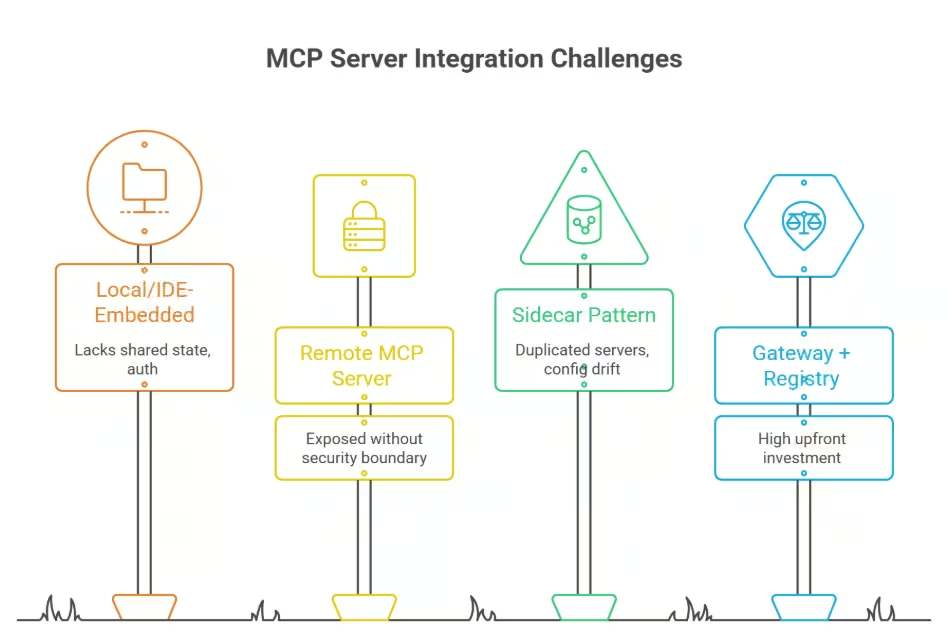
Four distinct integration topologies have emerged as enterprises scale MCP server deployments beyond initial pilots. Each pattern solves a specific problem and carries a distinct scaling ceiling.
1. Local / IDE-Embedded
The MCP server runs as a local process on the developer’s machine. Claude Desktop, VS Code agent mode, and Cursor all natively support this pattern. Latency is minimal because communication stays within a single host. Infrastructure overhead is zero, and configuration lives in a local JSON file.
This pattern is well-suited for individual developer tooling and rapid prototyping. It breaks down when teams need shared state, centralized authentication, or audit trails. A local server is invisible to security tooling and to other teams. It works for single-developer workflows. It is impractical for org-wide MCP server integration.
2. Remote MCP Server (HTTP/SSE)
The MCP server deploys as a standalone service accessed over the network. HTTP with Server-Sent Events is the standard transport for remote deployments. This topology enables multi-user access and centralized deployment. Teams can manage the server like any other containerized microservice.
The remote pattern breaks when an explicit security boundary is absent. Exposed remote servers with zero authentication represent the most common misconfiguration in the MCP ecosystem. Every remote MCP server accessible over a network requires auth on every request. “Internal network” is an insufficient substitute for access control.
3. Sidecar Pattern
The MCP server deploys alongside AI agent containers in a Kubernetes environment. Each agent instance gets its own dedicated MCP server. Isolation is strong, and ownership boundaries are clear on a per-agent basis.
This pattern fails when multiple agents need access to the same tools. Duplicated servers create configuration drift and version inconsistency across sidecar instances. A tool schema update requires coordinated changes across every sidecar deployment. Maintenance cost scales linearly with agent count, compounding with each new instance.
4. Gateway + Registry
A single MCP endpoint federates requests to multiple backend MCP servers. The gateway centralizes authentication, routing, policy enforcement, and rate limiting. A companion registry tracks server inventory, active versions, owners, and lifecycle states.
This topology requires the most upfront investment in infrastructure and governance design. It is also the only pattern that scales MCP server integration across multiple teams and AI hosts. It breaks down if the gateway becomes a monolithic bottleneck or the registry lacks version governance. Standard platform engineering practices mitigate both risks.
Choosing the Right Pattern
The decision comes down to four factors.
First is blast radius: what breaks if this server fails or is compromised?
Second is security boundary ownership: who enforces auth and access control?
Third is the balance between team autonomy and organizational consistency.
Fourth is scope: does the integration serve a single developer workflow or an enterprise capability?
Most organizations will run multiple patterns simultaneously as MCP adoption matures. Developer tooling stays local. Shared organizational capabilities route through a gateway. Defaulting to one pattern for every use case without evaluating these criteria is a common and costly mistake.
Also Read: RTS Experiment: Testing Context Adherence Across 10 Cloud & Local Models
| Dimension | Local / IDE-Embedded | Remote (HTTP/SSE) | Sidecar | Gateway + Registry | Best-fit Scenario |
|---|---|---|---|---|---|
| Latency profile | Lowest (local process) | Low to moderate (network hop) | Low (pod-local) | Moderate (gateway + backend hop) | Performance considerations |
| Security boundary | None (developer machine) | Per-server (requires explicit auth) | Per-agent container | Centralized (gateway-enforced) | Security and access control |
| Scaling ceiling | Single user | Multi-user, single server | Per-agent duplication | Multi-team, multi-host | Scalability characteristics |
| Team ownership model | Individual developer | Server team | Agent team per sidecar | Federated: teams own servers, platform owns gateway | Operational ownership |
| Best-fit scenario | Developer tooling, prototyping | Small team, single shared server | Isolated agent workloads | Enterprise-scale, multi-agent, governed | Recommended use case |
The Gateway Model in Practice: Centralizing MCP Server Integration
The gateway pattern is the convergence point for enterprise-scale MCP server integration. Teams running more than a handful of MCP servers across multiple AI hosts will arrive at this model. The question is how to build it correctly from the start.
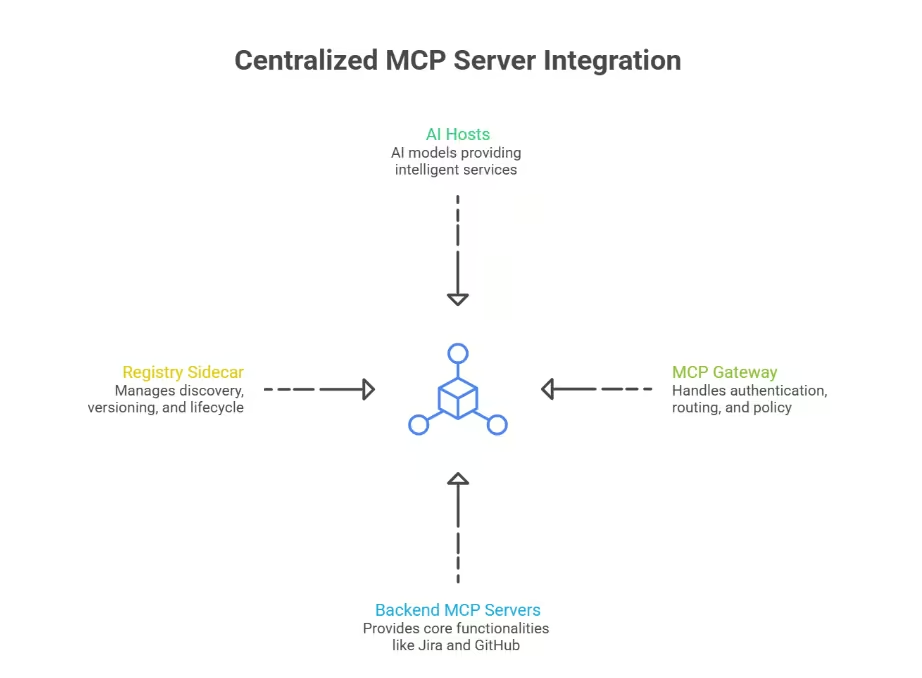
1. What the Gateway Does
The MCP gateway presents a single streamable HTTP endpoint to all AI hosts and agents. Behind that endpoint, it federates tool calls to the appropriate backend MCP servers. The gateway handles OAuth 2.1 authentication with PKCE (Proof Key for Code Exchange), tool allowlists, per-agent views, and structured audit logging.
Claude, Copilot, internal copilots, and custom agent frameworks all connect to one gateway endpoint. The gateway routes each tool call to the correct backend server based on policy and configuration. This eliminates the need for every AI host to maintain separate connections to every MCP server in the fleet.
2. Build Order Matters
Auth and origin validation come first in the implementation sequence. This is the most consequential design decision in gateway construction. Teams that defer security to a later phase routinely ship unauthenticated gateways to production.
Arcade’s documented 10-step build order provides a practical reference for teams designing their own gateway layer. The sequence starts with a single streamable HTTP endpoint. Origin validation and safe defaults come next. Front-door auth on every request follows, configured to fail closed.
Tool allowlists and named surfaces come before broad tool discovery is enabled. Per-agent views and token discipline with audience binding follow. Structured audit logs and rate limiting by caller and tool round out the core. On-demand tool discovery through deferred loading and search is the final step.
The operating principle is clear: restrict first, then expand based on observed data.
3. Registries Solve Discovery and Governance
Without a registry, teams cannot answer basic governance questions about their MCP server fleet. Which servers exist in production? What versions are currently active? Who owns each server, and what lifecycle state is it in?
A well-designed registry enforces lifecycle states: active, deprecated, and decommissioned. It also enforces access policies per server and per consumer. Azure API Center, operating as a private enterprise MCP registry, is one documented model. The specific tooling matters less than the core requirement: every MCP server must be registered, versioned, and assigned a clear owner.
4. Managing Tool Surface Size
The gateway is the correct enforcement point for controlling how many tools an LLM sees at any given time. Large tool surfaces degrade selection accuracy. When an agent has access to 40 or 60 tools simultaneously, the LLM is more likely to select the wrong tool. Hallucinated tool calls also increase at that scale.
Keep a small set of frequently used tools visible to the agent by default. Defer the rest and load them via search only when an agent needs broader access. This constraint directly mitigates non-deterministic tool selection by keeping the active tool surface focused.
Seven Failure Modes That Derail MCP Server Integration at Scale
Scaling MCP server integration introduces failure modes absent from single-server deployments. These issues compound as server count, agent diversity, and organizational dependency increase.
Each one listed here has been observed in production environments or documented by security researchers. Every entry includes a concrete mitigation.
Failure Mode 1: Unauthenticated Remote Servers
This is the most common and most dangerous failure mode in the MCP ecosystem. A Knostic scan of approximately 2,000 internet-exposed MCP servers found that every verified server lacked any form of authentication. Separately, Backslash Security identified roughly 2,000 additional servers with over-permissioned access on local networks.
Mitigation: Fail-closed authentication on every request with zero exceptions. OAuth 2.1 with resource indicators per the June 2025 MCP authorization specification. Servers labeled “internal only” still require enforced auth at the transport layer.
Failure Mode 2: Tool Sprawl and Non-Deterministic Selection
When dozens of teams publish MCP servers with overlapping or ambiguous tool descriptions, LLMs select the wrong tool. They may also hallucinate tool calls that match no registered tool. This problem worsens in proportion to the tool surface available to each agent.
Mitigation: Curated tool surfaces scoped per agent and per workflow. The tool allows lists to be enforced at the gateway layer. Apply strict naming conventions with clear, non-overlapping descriptions across the server fleet..
Failure Mode 3: Prompt-Schema Drift
AI prompts and tool schemas change on different timelines managed by different teams. A schema change can break agent behavior silently without triggering any error. The agent still calls the tool successfully, but the response structure misaligns with the prompt logic’s expectations.
Mitigation: Schema versioning with explicit version identifiers on every tool definition. Contract testing in CI (Continuous Integration) validates prompt-schema compatibility before deployment. Canary rollout of schema changes to a limited subset of agents precedes broad exposure.
Failure Mode 4: Latency Amplification from Chained MCP Calls
Multi-step agent workflows that chain three or four MCP servers introduce compounding latency at each hop. Each server adds network transit time, processing overhead, and backend call duration. A workflow that appears fast in isolation becomes unacceptably slow when composed into a chain.
Mitigation: Measure end-to-end tool-call latency as a first-class Service Level Indicator (SLI) across the entire chain. Set explicit timeout budgets per chain depth level. Composite tools that combine common multi-step patterns into single server-side operations reduce hop count.
Failure Mode 5: Over-Permissioned Tool Access
Agents with write access to production systems and zero external guardrails represent a direct operational risk. Default configurations grant broad permissions because restrictive scoping requires additional upfront design effort. The consequence is that an agent can execute destructive actions without any approval gate.
Mitigation: Least-privilege scopes on every tool by default. Human-in-the-loop approval gates for destructive actions such as deletes and bulk writes. Progressive scoping starts narrow and expands only based on validated operational need.
Failure Mode 6: Context Window Waste from Bloated Resources
Poorly designed MCP resources dump large payloads directly into LLM context windows. This crowds out useful reasoning space and inflates token cost per interaction. An MCP resource that returns a full database schema when the agent needs only a single table definition wastes thousands of tokens per call.
Mitigation: Return summaries by default from every resource endpoint. Offer detail-on-demand through follow-up tool calls when the agent needs deeper information. Measure token cost per tool call and establish budgets per agent workflow.
Failure Mode 7: Zero Observability into Tool-Call Behavior
Teams deploy MCP servers into production and then find themselves unable to answer basic operational questions. Which tools are called most frequently? What is failing, and at what rate? What is slow? Without tool-call-level telemetry, debugging agent behavior requires manual log archaeology across multiple systems.
Mitigation: Structured audit logs with consistent fields across the fleet: caller identity, tool name, server identity, latency, outcome, and error code. Pipe this telemetry into existing APM (Application Performance Monitoring) stacks. Build dashboards that surface tool usage patterns, server-level error rates, and latency distributions.
Production Readiness: Five Domains That Determine Scale
Scaling MCP server integration from pilot to production fleet demands the same rigor applied to any critical infrastructure component. The five domains below map to the failure categories observed in enterprise MCP deployments.
For each, the article covers the principle and the pass criteria. Teams seeking implementation-level specifications (exact log field schemas, deployment configurations, and alerting thresholds) can request the companion technical checklist from RTS Labs.
1. Security and Authentication
OAuth 2.1 with PKCE is required on every remote MCP server, including those labeled “internal.” Scoped access must be enforced per agent and per user identity. Resource indicators, per the June 2025 MCP authorization specification, ensure that tokens are audience-bound to specific MCP servers.
Human-in-the-loop approval gates are mandatory for tools with write access to production systems. The Replit incident documented by Descope illustrates why: an AI agent deleted a production database containing over 1,200 records despite explicit instructions to freeze all actions. External guardrails enforced at the gateway layer would have prevented execution. Prompt-level instructions alone are insufficient for destructive operations.
2. SLIs and SLOs
Service level indicators should cover tool-call latency (at key percentiles), tool-call success rate, and auth failure rate. SLOs need to vary by server criticality. A Jira MCP server supporting customer-facing agents warrants tighter SLOs than an internal wiki server.
Alert on SLO burn rate rather than raw error counts. A brief spike during deployment is expected behavior. A sustained burn rate threatening the error budget over a 30-day window requires immediate investigation.
3. Deployment and Scaling
Containerize every MCP server. Deploy behind load balancers with horizontal autoscaling based on request volume. Health check endpoints on every server enable automated detection of degraded instances.
Blue/green or canary deployment strategies are essential for schema changes. A tool schema update pushed to 100% of agents simultaneously creates a blast radius spanning every consuming workflow. Canary rollout to a limited agent population validates compatibility before broad exposure.
4. Observability
Structured logs with consistent fields across the fleet are the foundation. Distributed tracing across the full call path, from the gateway to the server to the backend system, is essential for diagnosing latency in chained workflows.
Build dashboards that surface tool usage patterns by frequency and caller, error rates grouped by server, and latency distributions over time. MCP observability should plug into your existing monitoring stack, with dedicated views for the tool-call-level behavior that standard APM misses.
5. Change Management and Lifecycle
Every MCP server integration follows a defined lifecycle: request, design, security review, staging validation, canary rollout, production monitoring, and deprecation. Staging environments validate new MCP servers against representative agent workloads before production exposure.
Version sunsetting requires enforcement at the gateway. After a published deprecation window, the gateway blocks tool calls to decommissioned server versions. Agents referencing deprecated tools receive structured error responses directing them to the active version.
Production Readiness Summary
| Domain | Pass Criteria |
|---|---|
| Security | OAuth 2.1 + PKCE on all remote servers; scoped access per agent; human-in-the-loop for write operations |
| SLIs/SLOs | Latency, success rate, and auth failure SLIs defined; SLOs set per server criticality; burn rate alerting active |
| Deployment | Containerized; load-balanced; health checks on every server; canary rollout for schema changes |
| Observability | Structured logs with standard fields; distributed tracing; dashboards in the existing APM stack |
| Lifecycle | Defined integration lifecycle; staging validation; gateway-enforced version deprecation |
Data Platform Integration
Data platform and integration teams can expose existing ETL, CDC, and event pipelines through MCP servers. This approach gives AI agents structured access to data workflows without new interface construction. A thin MCP server wrapping an existing data pipeline endpoint carries far less risk than granting agents direct database access.
The MCP server acts as an access-controlled, schema-defined boundary between the agent and the data system. It enforces what the agent can query, what shape the response takes, and what volume of data returns per call.
Ownership Model
Decide early whether MCP servers are owned by backend system teams or by a central AI platform team. Most enterprises will land on a federated model. Backend teams build and maintain individual MCP servers. A central platform team owns the gateway, registry, security standards, and observability infrastructure.
This mirrors how most organizations govern microservices and internal APIs. The pattern is familiar. Applying it to MCP server integration prevents the most common organizational failure: treating MCP as a special category outside normal platform governance.
Three Spec Changes Your Gateway Design Should Anticipate
The MCP specification is under active development. Three proposed enhancements carry direct architectural implications for teams designing gateways and registries today.
Secure elicitation introduces out-of-band authentication flows for sensitive operations. The architectural implication: your gateway must support routing approval prompts outside the agent’s context window. Design the approval-gate mechanism as a pluggable component rather than hardcoding it into gateway logic.
Progressive scoping defines default permission sets with structured escalation paths, replacing the current all-or-nothing access model. Gateway teams should build permission management with graduated scopes from the start. Retrofitting escalation paths into a flat permission model is significantly more expensive.
Client ID metadata documents enable dynamic client trust verification without pre-registration. This shifts client onboarding from a manual registration step to a metadata-driven verification flow. Gateways that assume a static, pre-registered client list will need rework.
Teams building custom gateways should architect for replaceability. Commercial and open-source gateway products will mature quickly. Tight coupling to a custom implementation creates migration costs later.
The integration pattern decision from earlier in this article is also worth revisiting over time. Most organizations will move from local to remote to gateway as the MCP server count increases. Build for that migration path now. Design MCP servers as stateless, transport-agnostic components that move between deployment topologies without rewriting tool definitions or auth logic.
Suggested Read: Track the official MCP specification changelog and Anthropic’s MCP documentation for real-time updates on spec changes, transport updates, and security enhancements.
MCP Server Integration Is Platform Infrastructure Now
The protocol debate is settled. MCP server integration is the standard interface between LLMs and enterprise systems. The operational question remains open at most organizations. Servers proliferate without governance. Auth is inconsistent. Tool surfaces grow without curation.
A well-defined path forward exists. Four integration patterns serve distinct scaling requirements. The gateway-plus-registry model is the only topology that supports multiple teams, AI hosts, and environments under a consistent policy. Seven documented failure modes are preventable with standard platform engineering practices. Production readiness requires the same rigor applied to any critical infrastructure: defined SLIs, structured observability, enforced lifecycle management, and security that fails closed.
The organizational muscle for MCP server integration already exists. The work is applying API governance, SRE discipline, and platform engineering practices to a new integration surface.
What RTS Labs Delivers
RTS Labs helps platform teams move from fragmented MCP deployments to governed, production-grade architecture. Our engagements typically start with an MCP fleet audit: mapping your current servers, identifying pattern mismatches, and assessing production readiness across all five domains.
From there, we design and build gateway architectures, implement registry and lifecycle governance, and integrate MCP observability into your existing monitoring stack. The output is an MCP integration layer that scales with your agent fleet under consistent security and operational policy.
The practical next step: Schedule an MCP architecture assessment to audit your current fleet against the production readiness framework and define the path from pilot-phase servers to enterprise-grade infrastructure.
Frequently Asked Questions (FAQs)
1. How does MCP server integration differ from native function calling APIs like OpenAI’s?
MCP is host-agnostic. One MCP server works across Claude, Copilot, custom agents, and any compliant client. Native function calling APIs lock tool definitions to a single provider’s format and runtime.
2. Can MCP servers connect to on-premises systems behind corporate firewalls?
MCP servers deployed inside the network perimeter access on-premises backends directly. The gateway exposes a controlled external endpoint. AI hosts connect to the gateway without requiring inbound firewall rules to backend systems.
3. What team structure supports MCP server integration at enterprise scale?
A federated model works best. Backend system teams build and maintain individual MCP servers. A central platform team owns the gateway, registry, security standards, and observability stack. This mirrors standard microservices governance.
4. How long does a typical MCP gateway deployment take for a mid-size organization?
Initial gateway infrastructure with auth, routing, and basic policy takes four to eight weeks. Registry integration, per-agent tool surfaces, and full observability instrumentation add another four to six weeks, depending on fleet size.
5. Does MCP server integration support real-time streaming responses to AI agents?
The streamable HTTP transport enables server-sent events for progressive response delivery. Agents receive partial results during long-running backend operations. This eliminates waiting for a single complete response payload.
6. Can MCP server integration coexist with existing API gateway products like Kong or Apigee?
MCP gateways handle MCP-specific routing, tool discovery, and agent policy. Existing API gateways continue managing REST and GraphQL traffic. Both can share auth infrastructure, observability pipelines, and network security policies.