
AI coding tools are now central to professional software development. Sonar’s State of Code 2025 survey found that developers estimate 42% of the code they commit is AI-assisted.
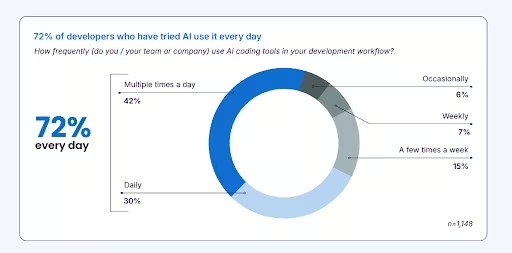
The same report found that 72% of developers use AI daily for vibe coding. However, the picture above is incomplete. Veracode’s 2025 GenAI Code Security Report tested over 100 large language models across 80 real-world coding tasks. It found that 45% of AI-generated code introduces OWASP Top 10 security vulnerabilities.
The fact that AI is being increasingly used in coding programs, and that coding programs using AI alone can introduce security vulnerabilities, is precisely the tension this guide exists to resolve.
Vibe coding is when developers produce code by just prompting AI tools with zero human oversight. It is likely to fail if the workflow around the AI is poor. We have seen this pattern repeatedly: a team ships a working prototype in a week, and six months later, they are asking why their codebase is unmaintainable, and their security audit returned 17 vulnerabilities. The difference is always the workflow, not the AI.
This guide is for professional developers, technical founders, and engineering leads who want a complete, honest framework.
What Is Vibe Coding and How Has It Changed in 2026?
Andrej Karpathy coined the term vibe coding in February 2025, and Collins Dictionary named it Word of the Year in 2025. Karpathy’s original definition was deliberately casual. It defined vibe coding as describing what you want, accepting what the AI generates, and not reading the code. It is best suited for throwaway projects where nothing critical is at stake.
Vibe coding in 2026 has evolved into two distinct practices. The first is pure vibe coding, involving rapid ideation, personal tools, and prototypes, where Karpathy’s original framing still applies. The second, and the subject of this guide, is responsible AI-assisted development, consisting of professional workflows in which AI generates output and humans review, validate, and own it.
Stack Overflow’s 2025 Developer Survey found that 72% of developers say vibe coding is not part of their professional workflow. But the same survey shows 72% of those using AI coding tools rely on them daily. The gap between adoption and professional use is exactly where vibe coding best practices live, and where the frameworks in this guide apply.
Professionals who use AI coding tools effectively are not prompting and accepting. They are prompting, reviewing, testing, and iterating with the same discipline they would apply to any production code. Here, the AI generates faster, and the developer still owns the outcome.
Where Should You Use Vibe Coding And Where Should You Not?
Before any best practice, developers need a clear scope map. The Green Zone and Red Zone framework below defines where AI can generate freely and where human ownership is non-negotiable. Knowing the boundary upfront is the single most effective way to prevent the security and architectural debt that accumulates when the line is left undefined.
| ✅ Green Zone (AI generates freely) | ❌ Red Zone (Human ownership required) |
|---|---|
| Prototypes and MVPs where speed matters more than polish | Authentication and authorization logic; AI consistently misses edge cases |
| Internal tools: admin dashboards, data scripts, workflow automations | Data sanitization and input validation are the most common vulnerability patterns in AI code |
| UI scaffolding: React components, CRUD operations, form wiring, landing pages | Financial calculations and regulated business logic; compliance requires human authorship |
| Repetitive patterns: test generation, documentation, migration scripts, boilerplate | Complex multi-service architectures; AI loses coherence across dozens of interconnected files |
| Security-sensitive systems; 45% of AI-generated code contains Open Worldwide Application Security Project (OWASP) Top 10 flaws (Veracode, 2025) |
In our experience working with teams that have transitioned AI-generated prototypes into production systems, the Red Zone is where most of the debt accumulates because the boundaries were never defined upfront regarding how much AI-led vibe coding and a human-centric approach are required.
Why Does Good Vibe Coding Require More Than Just Prompting?
If you consider vibe coding to be just prompt engineering, you are looking at only half the picture. Responsible AI-assisted development requires two distinct capabilities, and the absence of either one produces a different failure mode.
- Prompt engineering is the ability to describe intent clearly, break problems into atomic pieces, provide context efficiently, and redirect when output drifts. This is the skill most developer content focuses on.
- Technical fluency is the ability to critically read generated code and determine whether it is correct, secure, and architecturally sound. This is the skill that separates production-ready vibe coding from technical debt accumulation. It is also the skill that closes the perception gap.
METR’s July 2025 randomized controlled trial, involving 16 experienced developers and 246 real tasks, found that developers using AI tools took 19% longer to complete issues than those working without them, despite expecting to be 24% faster.
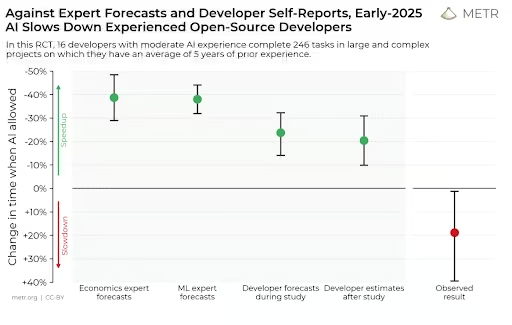
After the study, they still believed they had been 20% faster. The 39-point gap between perception and measured reality is the most important number in that study. The reason is not that AI is unhelpful. It is because AI output requires more review than its surface appearance suggests. Technical fluency is what closes this gap.
Sonar’s State of Code 2025 survey reinforced this finding. Developers cite ‘AI solutions that are almost right, but not quite’ as their top frustration. 38% report spending more time debugging AI-generated code as a result. The workflow that prevents this is not better prompting alone. It is prompt engineering combined with a systematic review.
Vibe Coding Best Practices: The Complete Workflow
GitHub Copilot alone generates 46% of the code written by its 20 million users. Vibe coding, in general, isn’t harmful if some best practices are followed. Below, we discuss 8 practices, each structured as a one-sentence principle followed by specific, actionable instructions.
Practice 1: Write a one-page specification before your first prompt
AI generates better code when its task is specific. It may not produce good code when it is given creative latitude over requirements. A one-page spec is the context the AI needs to produce output you can actually use. Include what you are building, who it is for, the core data model, the key user flows numbered precisely, and what success looks like as a testable outcome.
If you can hand the spec to a developer you have never met and they can build it without a follow-up call, it is specific enough for an AI to handle.
Practice 2: Prompt atomically, not comprehensively
Broad prompts produce fragile, unmaintainable code. One feature or component per prompt should be the norm. Never combine authentication, UI, and database schema in a single instruction. The AI makes architectural choices you did not intend when the scope is ambiguous.
If you cannot describe the expected output in two sentences, the prompt is too broad. Break it down further.
Practice 3: Read every line before you accept it
Accepting AI output without reading it is how you accumulate security debt. The code looks finished and often runs correctly on the first try. That surface appearance is exactly what makes unreviewed AI code dangerous. Look specifically for hardcoded credentials, missing input validation on any user-facing field, SQL queries built with string concatenation, authentication checks that exist only in the UI layer, and error messages that expose system internals.
Veracode found cross-site scripting (XSS) vulnerabilities in 86% of relevant AI-generated code samples. Surprisingly, the code functioned correctly and was visually indistinguishable from secure code.
Practice 4: Commit before every new prompt, not after
Version control is your escape hatch. AI changes are difficult to revert partially. Commit before each prompt so you can always return to a working state. Write commit messages that note what the prompt was and what the change was supposed to accomplish. This creates an audit trail for your future self and your team. Reset aggressively when AI goes off track, adds dependencies you did not request, or breaks working functionality. Resetting and starting with a more specific prompt is always faster than trying to fix AI drift.
Practice 5: Manage context deliberately
AI context degrades over a long conversation. The longer a session runs, the more the AI loses track of earlier constraints and architectural decisions. Start fresh conversations for each new feature and provide the relevant context explicitly at the start of each session. For larger projects, maintain a context document, i.e., a summary of your tech stack, architectural decisions, naming conventions, and constraints, and paste the relevant section at the beginning of each new session.
Practice 6: Include security requirements in every prompt
AI prioritizes making features work over making them secure. Security is a non-functional requirement, and models treat it as secondary unless explicitly instructed otherwise. Add to every prompt that touches user data or authentication: ‘Validate all user inputs, use parameterized queries, sanitize outputs, and include error handling that does not expose system internals.’
After generation, run a static analysis security testing tool before committing. Automated scanning is the safety net that catches what manual review misses at the speed AI generates code.
Practice 7: Test AI-generated code the same way you test human-written code
AI-generated code does not have a lower testing standard. Rather, it has a higher one, because the author does not fully understand what it does. Write unit tests for every function containing business logic. Test edge cases explicitly.
AI handles the happy path reliably and misses the rest consistently. Prompt the AI to generate tests for its own output, then read those tests critically. They reveal the assumptions the AI made that you may not have intended.
Practice 8: Document architectural decisions as they happen
AI-generated codebases are harder to maintain than human-written ones because the reasoning behind choices is not recorded. For every non-obvious architectural decision, write a one-paragraph decision record: what was the choice, what were the alternatives considered, and why was this one made. This is the difference between a maintainable codebase and what developers increasingly call ‘AI spaghetti’, working code that nobody on the team can confidently change.
Advanced Prompting Techniques That Change Results
The practices above form the workflow. These techniques change the quality of AI output itself. They are the difference between directing an AI and collaborating with one.
Chain-of-thought prompting for complex logic
Ask the AI to explain its approach before writing code: ‘Before writing any code, explain how you plan to structure this feature and what edge cases you are accounting for.’ The plan reveals assumptions you can correct before writing code, which is far faster than correcting code after it is generated.
Constraint-first prompting
State what you do not want before what you do: ‘Do not use any third-party authentication libraries. Do not store session state in the database. Now build the login flow.’ Constraints prevent the AI from making default choices you would not have selected, particularly around dependencies and security implementations.
The review-and-critique loop
After generation, prompt the AI to critique its own output: ‘Review the code you just wrote. What are the three most likely security vulnerabilities or edge cases that could cause problems in production?’ The self-critique surfaces issues that were deprioritized during the generation process. It is not a substitute for your own review, but it consistently surfaces one or two things you would have missed.
Explicit technology pinning
Specify exact frameworks, libraries, and versions where architectural choices matter. Unpinned prompts produce code that imports whatever the AI considers standard, which may introduce dependencies that conflict with your existing stack, are no longer actively maintained, or carry their own known vulnerabilities.
Which Vibe Coding Tool Should You Use?
Tool choice matters less than workflow discipline. A structured workflow with a basic tool outperforms an undisciplined workflow with the most capable tool available. That said, different contexts favor different tool categories.
| Your context | Tool category | Why |
|---|---|---|
| Starting, no technical background | Full-stack app builders with integrated hosting and database | Handles infrastructure automatically; no separate account or configuration needed to deploy a working app. |
| Professional developer, existing codebase | IDE-integrated AI coding agents with codebase context | Supports multi-file changes while being aware of your existing architecture. Look for tools that allow team-level rule files to bake standards into the AI context. |
| Complex multi-step agent or AI orchestration logic | AI coding agents with strong reasoning for architecture | Prioritize large context windows and strong performance on multi-file reasoning tasks over tools optimized for autocomplete speed. |
| Enterprise team with governance requirements | IDE tools with shared configuration and team rules | Look for shared context files applied across the team. Governance is a workflow decision first, tool decision second. |
The Vibe Coding Ceiling
The Vibe Coding Ceiling is the point at which a project’s complexity, security requirements, or long-term maintenance needs exceed what AI-assisted development can reliably handle. Recognizing this ceiling early is a best practice in itself.
Five signals that you have reached it:
- The debugging loop does not resolve. The AI fixes one bug and introduces two more. You have spent more time debugging than the initial build took. This is the Doom Loop, and it signals the underlying architecture needs human review, not more prompts.
- The codebase contains conflicting patterns. Different files use different state management, database access patterns, or authentication approaches. The AI switched technologies midstream, and the codebase reflects every twist.
- You cannot explain what the code does. If you cannot trace a data flow from input to output and explain it in plain language, you do not own the codebase. Shipping something you cannot explain is a liability.
- Compliance- or regulated-business-logic is required. HIPAA, GDPR, SOC 2, and PCI DSS all require documented authorship, auditable decisions, and human accountability. AI cannot sign off on a compliance audit.
- Real users with real data are involved. When financial transactions, health records, or personal data are at stake, a professional security review is required regardless of how the system was built.
Also Read: Off-the-Shelf vs Custom AI Solutions: Which Fits Your Business?
RTS Labs works with companies that have hit the Vibe Coding Ceiling, typically when a proof of concept is ready to become a production system, or when a team’s informal adoption of AI coding tools needs to be formalized into a governed workflow. The transition from prototype to production is where most of the debt accumulates, and it is where a professional engineering review can change the outcome.
How Should Engineering Teams Govern Vibe Coding Adoption?
Governance is more of a workflow than a policy document. The governance question every engineering lead needs to answer is: what happens to AI-generated code between generation and production? If the answer is ‘it depends on the developer,’ the team has no governance, and the consequences will be inconsistent security posture, architectural fragmentation, and codebases that no single person fully understands.
Also Read: What Is AI Governance? A Complete Guide
Four governance decisions every engineering team needs to make
1. Define mandatory review tiers
All AI-generated code that touches authentication, data handling, or external APIs requires senior review before merging because the author cannot attest to what the AI does. Make this explicit in your pull request template. Do not consider it as an unspoken expectation.
2. Automate security scanning in CI/CD
Run a static analysis security testing tool on every pull request as a blocking check. Manual review misses vulnerabilities that automated scanning reliably catches, particularly at the speed at which AI generates code.
3. Maintain shared context files
Teams using IDE-integrated AI coding tools should maintain shared configuration files that embed architectural decisions, naming conventions, and technology constraints into every developer’s AI context. This prevents the AI from making inconsistent choices across the team. Different developers prompting the same tool without shared context will produce divergent architectural patterns that compound over time.
4. Define Green Zone and Red Zone boundaries for the codebase
Write down explicitly which parts of your system can be AI-generated and which require human authorship. Make it part of onboarding documentation. Sonar’s 2025 research found that 35% of developers access AI tools through personal accounts rather than company-approved environments. Shadow adoption creates governance blind spots that documented boundaries directly prevent.
RTS Labs supports engineering teams in building these frameworks and integrating AI coding governance into existing DevOps and security workflows.
What Does the Future of Vibe Coding Look Like?
Five directional trends are already visible in 2026 research and will define responsible AI-assisted development over the next two years.
- Multi-agent systems reduce context loss. Instead of a single AI model managing an entire codebase, specialized agents handle specific layers via structured handoffs, directly addressing the single biggest technical limitation of current vibe coding.
Also Read: Top AI Agent Development Companies in 2026
- Governance tooling matures. The conversation shifts from ‘generate more code’ to ‘explain and constrain code.’ Audit trails, prompt logging, and AI output attribution will become standard features in enterprise development environments.
- The dual-skill requirement becomes a hiring criterion. Technical fluency combined with AI direction ability becomes an explicit job requirement. Developers who can critically review AI output will be valued above those who can only prompt.
- Regulated industries develop AI coding compliance frameworks. HIPAA, GDPR, and financial regulators will publish explicit guidance on AI-generated code in compliance-relevant systems, formally defining the Red Zone concept across industries.
- The Vibe Coding Ceiling moves up but does not disappear. As models improve at codebase context and multi-agent systems mature, the complexity threshold at which human engineering must take over will increase. But production software demands that it remain.
Discipline Is the Multiplier, Not the Bottleneck
Vibe coding is not a shortcut to good software. It is a multiplier on clear thinking. The developers and teams who use it well bring the same discipline they would to any professional engineering work: clear specifications, systematic review, rigorous testing, and honest boundaries about what AI can and cannot own. The speed AI delivers is real. What it multiplies is entirely determined by the quality of the workflow around it.
The Vibe Coding Ceiling is not a limitation to be frustrated by. Rather, it is a useful boundary. The point at which AI-generated code stops being the right tool is the point at which real engineering decisions need to be made. That transition, done well, is what separates a prototype from a product.
If your team is hitting the Vibe Coding Ceiling or building governance around AI-assisted development, RTS Labs offers a free AI Workshop to assess your current workflow, identify the gaps, and define the next step; no commitment required.
Frequently Asked Questions (FAQs)
1. What are vibe coding best practices?
Vibe coding best practices are the structured workflows, review processes, and quality standards that allow developers to use an AI code generator productively without accumulating security vulnerabilities, architectural debt, or unmaintainable codebases.
2. Is vibe coding appropriate for professional software development?
Yes, with the right practices in place. Stack Overflow’s 2025 Developer Survey found that 72% of developers say vibe coding is a part of their professional workflow. The developers who use AI coding tools professionally consistently review every line of AI-generated code, apply automated security scanning, and maintain clear boundaries between AI-generated and human-authored sections.
3. What are the biggest security risks in vibe-coded applications?
The most common patterns behind security risks in AI-led code are missing input validation, Structured Query Language (SQL) queries built with string concatenation, hardcoded credentials, and authentication checks enforced only in the UI layer. These vulnerabilities are dangerous specifically because the code runs correctly without obvious errors. Both manual review and automated static analysis scanning are required to catch them reliably.
4. How should an engineering team govern vibe coding adoption?
Team-level governance requires four decisions: which code requires mandatory senior review before merge, whether automated security scanning runs in continuous integration/continuous deployment (CI/CD)as a blocking check, whether shared configuration files embed architectural decisions into every developer’s AI context, and which parts of the codebase can be AI-generated versus which require human authorship.
5. When should I stop vibe coding and bring in professional engineers?
Five signals that point to Vibe Coding Ceiling: you are in a debugging loop that does not resolve, the codebase contains conflicting architectural patterns, you cannot explain what the code does in plain language, compliance-regulated functionality is required, or real users with real data are going to use the system in production. Recognizing this ceiling early and transitioning to a professional engineering workflow is itself a best practice.