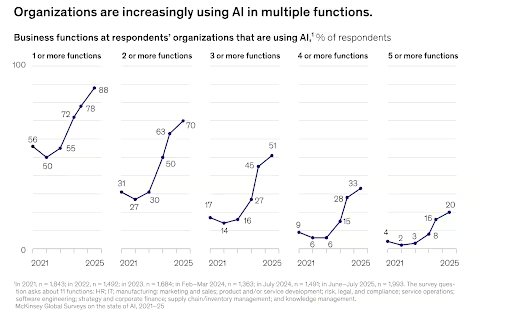
More than two-thirds of organizations report using AI across two or more functions, and more than half report having three or more AI-led functions (McKinsey).
While most companies have added AI tools to their workflows, very few have actually optimized those workflows with AI. McKinsey’s 2025 State of AI report finds that the gap is more of a financial nature than a semantic strain.
The survey, based on nearly 2,000 organizations across 105 countries, found that only 6% of companies qualify as AI high performers, generating more than 5% EBIT impact from AI.
This small percentage of high-performing organizations fundamentally redesigned their workflows before and alongside the deployment of AI, at nearly three times the rate of other organizations.
AI workflow optimization is a process redesign problem. The companies generating real, measurable returns from AI in 2026 are not the ones with the most tools. They are the ones that asked a different question: ‘Should this process exist at all, and if so, how should it be rebuilt around AI?’
This guide explains what AI workflow optimization actually means, why most workflows fail to deliver ROI, the maturity stages organizations move through, and a step-by-step framework for moving from experimentation to production-grade, measurable AI workflows.
Definition: AI Workflow Optimization
AI workflow optimization is the process of redesigning business workflows by embedding AI into the data, decision, and automation layers, making them faster, more reliable, and more scalable across the enterprise.
It is distinct from AI automation: automation asks, ‘How do we do this faster?’ Optimization asks whether we should be doing this at all, and if so, how should the entire process be rebuilt?’
What Is AI Workflow Optimization?
Before investing in optimization, it is worth being precise about what the term actually covers because the most common mistake organizations make is treating it as a synonym for adding AI tools to existing processes. However, organizations must understand the difference. The distinction determines whether the investment delivers measurable returns or compounds existing inefficiencies.
What AI Workflow Optimization is
- Redesigning existing workflows using AI to remove bottlenecks, reduce manual decisions, and improve reliability at scale
- Connecting AI to live business data systems — customer relationship management platforms (CRMs), enterprise resource planning systems (ERPs), and data warehouses, so decisions are based on current, accurate information rather than stale exports
- Building predictive, self-improving workflows with monitoring, feedback loops, and drift detection built in from the start
AI workflow optimization is a combination of three disciplines working together: process optimization, AI integration, and data architecture. All three must be present for optimization to work.
What AI Workflow Optimization is Not
- Adding ChatGPT or a copilot to an existing broken process. The AI will produce faster outputs of the same quality, which is not optimization.
- Replacing one manual task with an AI tool while leaving the surrounding workflow unchanged. Isolated automation does not change how work flows.
- Building a single AI agent in isolation, without connecting it to the broader data and process ecosystem. Disconnected agents produce inconsistent results.
- A technology project. It is a business process project that happens to use technology, and that distinction determines who needs to own it.
Benefits of AI Workflow Optimization
AI workflow optimization delivers returns across every layer of the business. Workflow optimization determines how quickly tasks are completed, how reliably decisions are made, and how far the same team can scale without adding headcount.
1. Faster Workflows and Reduced Manual Effort
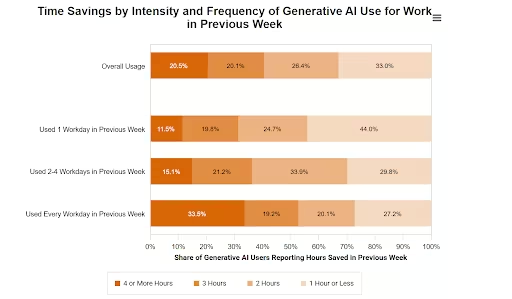
Optimized AI workflows eliminate the repetitive steps, decision delays, and system handoffs that consume the majority of process time. McKinsey’s research shows that employees could save an hour or more of daily activities that already have the technical potential to be automated, and by 2030, that figure could rise to three hours per day as AI use cases expand (AI in the Workplace Report by McKinsey). The compounding effect across a team is significant: 240 hours per employee per year, per conservative industry estimates.
2. Better Accuracy and Fewer Errors
Workflows that embed AI into data processing and decision logic reduce the dependency on manual data entry and human judgment for routine decisions. The Federal Reserve’s research found that workers using generative AI (GenAI) saved 5.4% of their work hours weekly, with frequent users saving over 9 hours per week (Federal Reserve Bank of St. Louis). These gains were driven primarily by reduced rework and error correction.
3. Higher Productivity Across Teams
AI high performers report pushing for transformative innovation rather than incremental efficiency, and McKinsey’s relative weights analysis of 25 attributes found that workflow redesign has the single strongest contribution to achieving meaningful EBIT impact of all factors tested (McKinsey’s State of AI Report). The productivity gains are not uniform: teams with strong underlying processes see AI multiply their effectiveness. Teams that skip the redesign step see the gains stay local and disconnected.
4. Better use of business data
Optimized workflows connect AI to live business systems such that every decision becomes data-informed rather than assumption-based. Data that previously sat unused in separate systems, such as CRM activity, support ticket history, and financial transactions, becomes an active input to workflow decisions.
5. More scalable operations
Workflows built on an optimized AI architecture scale across teams and departments without proportional headcount growth. Gartner predicts that by 2026, 40% of enterprise applications will be integrated with task-specific AI agents, up from less than 5% in 2025 (Gartner). The organizations positioned to benefit from that shift are the ones that have already redesigned their workflows to support it.
Why Most AI Workflows Fail to Deliver Real Business Impact
Most AI workflows fail because the workflow around the AI was never designed to support it. McKinsey’s 2025 The state of AI in 2025: Agents, innovation, and transformation survey found that while 88% of organizations use AI in at least one function, only 39% report that AI has had any measurable effect on their company’s earnings (McKinsey). The failure modes below account for the gap.
1. Tool Layering
AI tools added on top of broken workflows without process redesign do not fix the workflow — they accelerate it, producing higher volumes of the same low-quality output. Only 21% of organizations using generative AI have redesigned at least some workflows. The remaining are running AI inside legacy operating frameworks and experiencing the inevitable ceiling that creates (McKinsey).
2. Data Isolation
AI systems running on disconnected or stale data are not optimized. An agent making decisions based on last month’s CRM export or a manually maintained spreadsheet will produce confident, consistent errors. The data pipeline connecting AI to live business systems is the prerequisite for everything that follows.
3. The Automation Ceiling
Most organizations reach the limit of what rule-based automation can deliver and mistake that limit for an AI limitation. Traditional automation handles the ‘what’; AI workflow optimization handles the ‘why’ and ‘when.’ Companies that confuse the two invest heavily in automation, discover the ceiling, and conclude that AI does not work. When the real issue is that they never moved beyond the first layer.
4. No Performance Measurement
Deploying AI workflows without baseline metrics, KPIs, or feedback loops produces systems that degrade silently. Accuracy drifts, edge cases accumulate, and costs increase without anyone noticing until the system has already failed visibly. Few organizations have mastered measuring their automation and AI initiatives, a gap that makes continuous improvement structurally impossible.
5. Organizational Resistance
AI workflow optimization changes which tasks people own, which decisions they make, and which systems they use. Without change management and structured adoption planning, even well-architected workflows stall before they reach the users they were built for.
McKinsey State of AI, 2025: Primary Research Finding
AI high performers are nearly three times more likely to have fundamentally redesigned individual workflows when deploying AI, and workflow redesign shows the single strongest correlation with achieving a meaningful EBIT impact among the 25 factors tested.
Source: McKinsey State of AI 2025, survey of 1,993 organizations across 105 countries
The 4 Stages of AI Workflow Optimization: Which Stage Are You In?
Most organizations know they are not getting full value from AI. Fewer can pinpoint precisely why, because the bottleneck changes at each stage of the optimization journey.
The framework below maps four distinct stages, the primary challenge at each, and the signal that indicates it is time to move forward. Use it to locate your current position before designing your next investment.
| Stage | Name | What is happening | Primary bottleneck |
|---|---|---|---|
| Stage 1 | Manual workflows with AI tools | Individual AI tools are used for isolated tasks like writing, summarizing, and data entry. No workflow redesign. | The AI is as disconnected as the process it is supposed to improve. Overall speed and quality unchanged. |
| Stage 2 | Partially automated workflows | Some manual steps removed. AI is beginning to connect to business tools, but through fragile integrations. | Data does not flow reliably between systems. AI decisions are inconsistent. Most companies stall here. |
| Stage 3 | Integrated AI workflows | AI embedded into core processes, connected to live data, with monitoring and human-in-the-loop controls. | Requires significant data architecture and integration work. Where most companies need external expertise. |
| Stage 4 | Optimized workflows at scale | AI driving measurable outcomes. Continuous improvement is built in. Workflows scaled across departments. | Governance and observability frameworks must be maintained as scale increases. Complacency is the primary risk. |
The Stage 2 to Stage 3 transition is where the majority of AI programs stall because the data architecture and integration work required at Stage 3 is more demanding than the AI deployment itself. This is the point at which most organizations benefit most from bringing in external implementation expertise.
The 5 Foundations of an Optimized AI Workflow
These five foundations are what separate Stage 2 from Stage 3. Organizations stuck at Stage 2 are typically missing two or three of them, often data infrastructure and monitoring. The foundations must be built in parallel, not in sequence: each one depends on the others to function reliably at scale.
1. Clear Workflow Structure
Document, map, and redesign every target workflow before introducing any AI. This mapping phase typically reveals that 30–40% of workflow steps are either redundant or should be eliminated. You cannot optimize a workflow you have not defined, and automating a broken process produces a faster broken process.
2. Reliable and Accessible Data
Stale or siloed data is the single most common cause of AI workflow failure in production, and the most frequently underestimated during planning. Build or upgrade real-time data pipelines connected to live systems before deploying AI agents.
3. Integration with Real Business Tools
Opt for an API-first integration strategy, with every AI component connecting through documented, versioned interfaces, which prevents the brittle point integrations that break when upstream systems change. MCP (Model Context Protocol) is emerging as the standard for enabling agents to connect to enterprise systems without having to rebuild integrations from scratch.
4. Automation and Human-in-the-Loop Balance
Defining exactly which decisions AI makes autonomously and which require human approval is governance at the workflow level. This balance shifts as confidence in the system grows, but it must be explicitly designed at the outset.
5. Monitoring and Continuous Improvement
Establish performance baselines before deployment, implement drift detection, feedback loops, and regular review cycles to turn a deployment into an optimized system. Workflows without monitoring degrade silently because they have no reliable signal of what is actually happening inside them.
How to Optimize AI Workflows: A Step-by-Step Framework
The framework below maps to the three-part formula that defines real AI workflow optimization: process optimization, AI integration, and data architecture. Each step builds on the previous one. Skipping earlier steps does not accelerate the process. Rather, it defers the consequences until they become more expensive to address.
Step 1: Identify high-impact workflows
Map all candidate workflows against three criteria:
- Business impact: revenue effect, cost reduction, decision quality
- Current pain: manual steps, error rate, time lost
- AI readiness: data availability, integration feasibility
Prioritize the intersection of high impact, high pain, and ready data. Do not focus on the workflows that are simply repetitive or easy to automate. Easy automation produces easy ROI, which is rarely the ROI that justifies an enterprise AI program to a CFO.
Step 2: Map the workflow before touching any technology
Document every step, every decision point, every system touchpoint, and every handoff between people or tools. Identify where delays accumulate, where errors originate, and where data quality breaks down. This mapping phase consistently reveals that a significant portion of workflow steps are either redundant or should be eliminated.
Also Read: How AI Process Mapping Helps Enterprises Identify Bottlenecks, Risks, and Inefficiencies
Teams that skip this step deploy AI into a workflow that was never designed to support it, and produce the Tool Layering failure mode.
Step 3: Fix the data architecture first
Audit the data sources the target workflow depends on. Ask:
- Are they real-time or batch?
- Centralized or siloed?
- Consistent in format and quality?
Build or upgrade data pipelines to give AI access to live, clean, contextually relevant business data before any model or agent is deployed.
Define data access policies. Figure out which systems AI can read from, which require human oversight before acting on, and validate them against compliance requirements if the workflow touches regulated data. Every data quality issue that exists at deployment will be amplified by AI activity at scale.
Also Read: How to Scale AI in Your Organization
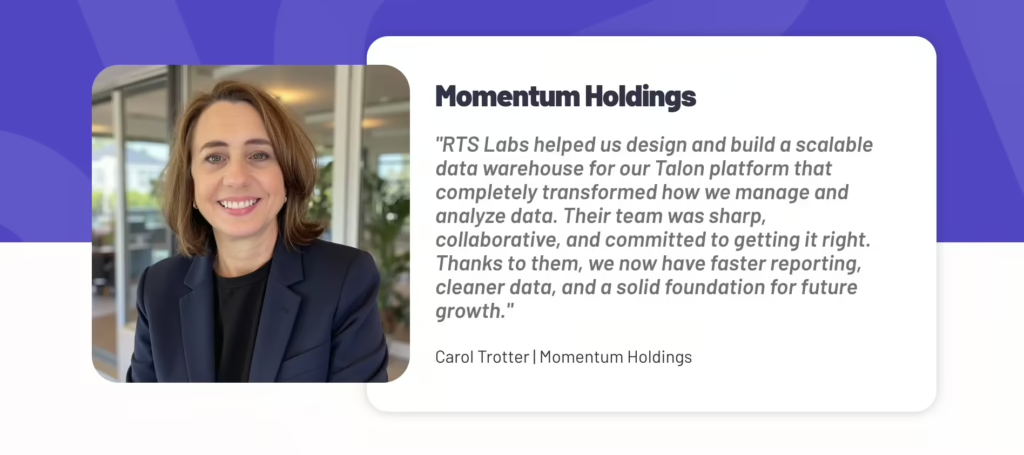
RTS Labs’ Data Engineering practice builds the pipeline architecture and data infrastructure that makes workflow optimization structurally possible. The Momentum Holdings engagement is a direct example: a scalable data warehouse built by RTS Labs produced a 4x improvement in reporting speed and a data foundation production-ready for AI workflow deployment across the organization.
Step 4: Integrate AI into real business systems
Every AI component should connect through documented, versioned APIs. An API-first integration strategy prevents the brittle point integrations that break silently when upstream systems update. Start with read-only integrations before write access. Build confidence in AI decisions before granting them the authority to take action on live business systems.
Platform choices, such as native integrations with Salesforce, Microsoft, or ServiceNow versus custom builds, depend on how locked in the existing stack is and how much internal maintenance capacity is available. The right answer is the one that can be maintained reliably over three to five years.
RTS Labs’ Platforms practice handles the integration layer across MuleSoft, Azure, Salesforce, AWS, and Snowflake, the systems where most enterprise workflows actually run.
Step 5: Measure, Monitor, and Optimize Continuously
Set performance baselines before deployment. Remember, without a before state, improvement cannot be demonstrated. Track workflow completion rate, error rate per step, time per task, cost per outcome, and human override frequency. Build feedback loops in which AI decisions are regularly reviewed, and the underlying model is updated based on real operational outcomes.
Establish a governance review cadence: monthly for high-risk or regulated workflows, quarterly for standard ones. Only scale to additional workflows when the current deployment is meeting defined thresholds across all tracked metrics.
Real Examples of AI Workflow Optimization by Industry
Each example below maps a specific business challenge to a specific solution and a documented outcome. These examples are real deployments anchored to named organizations and verifiable results.
Conversational AI for customer support: Suncoast Credit Union
Support teams at Suncoast were spending the majority of their time searching internal knowledge bases to answer member queries. RTS Labs built a retrieval-augmented generation (RAG) powered conversational AI grounded in Suncoast’s internal documents, with an OpenAI web search fallback for queries outside the document scope.
The outcome was faster answer retrieval, a measurable reduction in escalation rate, and support teams redirected to the work where human judgment is irreplaceable. Read the full case study here.
Sales Analytics Workflows: Evergreen
Evergreen’s sales representatives were spending pre-call preparation time manually pulling client revenue data, product usage figures, and trend information from multiple systems.
RTS Labs built a conversational AI that gives sales teams real-time, natural-language access to all that data in a single interface. The outcome was faster pre-call preparation, more informed client conversations, and sales teams focused on relationship and strategy.
Read the full case study here.
Data and Reporting Workflows: Momentum Holdings
Momentum Holdings’ operational reporting ran on fragmented data from multiple systems, requiring manual consolidation before any decision could be made. RTS Labs built a scalable data warehouse for the Talon platform that unified data sources, automated consolidation, and created a reliable architecture for AI-driven reporting.
The outcome was a 4x improvement in reporting speed, significantly cleaner data, and a foundation structured for further AI workflow deployment.
Document Processing Workflows for Legal: PLG
PLG needed to handle high volumes of legal document review, contract analysis, and compliance checks without proportionally scaling headcount. RTS Labs implemented AI-assisted document processing, enabling PLG to manage that volume at the precision standards that legal work demands.
Read the full case study here.
When Should a Company Work With an AI Implementation Partner?
A consulting partner does not replace an internal team. It closes the specific gaps of data engineering depth, integration architecture, and governance design that cause most internal AI workflow programs to stall between Stage 2 and Stage 3.
The five triggers below are diagnostic: if your organization recognizes itself in one or more of them, bringing in an experienced partner will shorten your path to production significantly.
- You have AI tools deployed, but workflows are still slow: Tool Layering has happened, and the underlying process was never redesigned. The issue is architectural, and not a matter of using better tools.
- Your data is not connected: AI is making decisions based on stale or siloed data, and the required integration work is beyond current internal capacity or timeline.
- Different teams are building AI solutions independently: fragmented workflows and inconsistent data connections are creating results that cannot be standardized or scaled.
- Costs are increasing without measurable improvement in outcomes: spend is scaling, but ROI is not, which signals that the architecture is wrong.
- You need production-grade workflows, not another proof of concept: you need a partner who commits to a deployment timeline, not a discovery engagement that produces a roadmap and ends there.
RTS Labs works with companies at Stages 2 and 3, past experimentation, and ready to build workflows that deliver measurable results. The 90-day production deployment commitment is structured to move organizations from the current-state audit to live deployment within a defined, predictable timeline.
AI Workflow Optimization vs AI Automation: What Most Companies Get Wrong
The most common strategic mistake in AI investment is treating workflow optimization as a subset of automation. It is an entirely different discipline, and the distinction determines whether the investment yields a faster version of the current process or a fundamentally better one.
Automation asks: ‘How do we do this faster?’ Workflow optimization asks: ‘Should we be doing this at all, and if so, how should the entire process be rebuilt around AI?’ Most organizations are investing heavily in the first question while the second goes unasked.
| AI Automation | AI Workflow Optimization |
|---|---|
| Tool-focused | Process-focused |
| Speeds up existing steps | Redesigns: Which steps exist |
| Short-term efficiency gains | Long-term scalability and reliability |
| Individual task level | End-to-end workflow level |
| Experimentation mindset | Production-ready systems |
| Technical project | Business transformation project |
| Added to the existing workflow | Workflow rebuilt around AI |
Also Read: AI Automation Implementation: Avoiding Failure and Scaling with Confidence
The ROI Is in the Redesign, Not the Deployment
The companies generating real returns from AI in 2026 are the ones that treated workflow redesign as the primary investment, and AI as the technology that makes that redesign possible at scale.
The path from Stage 2 to Stage 3, i.e., from fragmented AI tools to integrated, measurable AI workflows, requires data engineering depth, integration architecture, and governance design that most internal teams have not yet built.
The organizations that move through this transition most effectively are those that bring in implementation expertise to close those specific gaps, not to replace the internal team but to do the infrastructure work that makes the internal team’s AI investments productive.
RTS Labs offers a free AI Workshop to assess your current workflow state, identify your biggest optimization gaps, and build a 90-day roadmap to production-ready AI workflows with no commitment required.
FAQs
1. What is the difference between AI workflow optimization and AI automation?
Automation speeds up existing process steps. Optimization redesigns which steps exist in the first place. It is the difference between a faster broken process and a fundamentally better one.
2. How long does AI workflow optimization typically take?
A well-scoped single workflow typically takes 60 to 90 days. Enterprise-wide programs spanning multiple workflows and data systems generally run six to twelve months.
3. Where do most AI workflow optimization programs fail?
At the Stage 2 to Stage 3 transition, when moving from isolated AI tools to integrated workflows connected to live business data. Data pipeline readiness and integration complexity are the two most common causes of failure at this stage.
4. Does AI workflow optimization require replacing existing systems?
An API-first integration approach connects AI to existing CRMs, ERPs, and data warehouses through documented interfaces. The goal is to make current systems more intelligent, not to replace them.
5. How do you measure the success of an AI workflow optimization program?
Set baselines before deployment and track workflow completion rate, error rate per step, time per task, cost per outcome, and human override frequency. Then review monthly for high-risk workflows and quarterly for standard ones.