
Snowflake’s managed Model Context Protocol (MCP) server carries no separate infrastructure charge. The trouble shows up weeks later, as warehouse credits and Cortex token usage climb with zero connection errors to explain them.
Agent queries look like ordinary warehouse activity, so the extra demand slips past routine reviews. A second risk sits in the data model, which causes an incomplete semantic view and lets Cortex Analyst return a confident answer built from the wrong columns.
Both risks shrink when the first release covers one bounded workflow with a spending baseline set in advance. Below is the setup path in both directions, followed by seven challenges and a fix for each.
What Is Snowflake MCP Integration?
Snowflake MCP integration connects compatible AI clients to account capabilities through the model context protocol, with declared tools governed by existing role-based access control (RBAC). Managed servers expose tools to external clients, while outbound MCP connectors let Cortex Agents and CoWork call external servers.
An MCP connection gives an AI client a standard way to call approved Snowflake capabilities. Existing RBAC still governs every call, and the connection can run in either direction.
1. Snowflake can serve Cortex tools to external AI clients
In server mode, a Snowflake-managed MCP server publishes selected tools to a compatible client such as Claude Desktop or Cursor. An analyst in that client could ask a revenue question through Cortex Analyst, or pull policy text through Cortex Search.
Each tool answers from governed account data, which keeps the source of truth inside Snowflake.
2. Snowflake agents can call tools in other systems
In client mode, outbound MCP connectors let Cortex Agents and CoWork reach tools hosted outside the account. A Snowflake agent could spot a data exception, then open a Jira ticket for the team that owns the source.
Every connector adds a separate outbound path, and each one gets its own access review.
3. Custom and open source servers cover the gaps
Workflows that extend beyond managed tools can use a custom server hosted on Snowpark Container Services. Open-source options such as Snowflake-Labs/mcp can support local testing, but the deployment owner must build the controls required for production use.
Third-party MCP gateways can manage access across multiple systems. This may help organizations with complex environments, but it introduces another dependency to secure and maintain.
| Integration Mode | What It Does | Auth Method | Typical Use Case | Main Limitation |
|---|---|---|---|---|
| Snowflake-managed MCP server | Exposes Cortex Analyst and Cortex Search, plus agent runs and SQL execution | OAuth 2.0 through a security integration; PATs for local development | Claude Desktop querying governed account data | Answer quality depends on the selected tool and the data model |
| Outbound MCP connectors | Let Cortex Agents and CoWork call external tools | OAuth credentials tied to an API integration | A Snowflake agent opening a Jira ticket | Each connector needs an outbound access review |
| Custom server on Snowpark Container Services | Runs containerized MCP tools inside the account | Application-managed auth with account controls | Business-specific tools beyond the managed set | Your team owns the code and container upkeep |
| Open source Snowflake-Labs server | Provides an open source MCP implementation | Credentials set by the deployment owner | Local evaluation and custom development | Production governance must be designed and run in-house |
| Third-party MCP gateway | Brokers agent access across connected systems | Depends on the vendor and deployment | Central access management across an enterprise stack | Adds another operational dependency |
What Changes for Snowflake Users After MCP Integration
Business users get governed answers in plain language, and data teams maintain one tool interface for every compatible model.
1. Analysts can ask business questions without writing SQL
An analyst might ask, “What was recognized revenue for EMEA last quarter?” Cortex Analyst turns that into SQL against the approved semantic view.
The answer should name its source view and retrieval time. Those two details let the analyst check the figure before it lands in a forecast.
2. Data teams reuse one interface across models
Any compatible client, from Claude to Cursor, reaches the same governed tools through one server. When the business adds a new model application, the data team reuses that server and skips another custom wrapper.
How to Set Up MCP Integration With Snowflake
Server-mode setup takes six steps, starting with the connection direction and ending with a read-only test. The diagram shows the order, and each step is detailed below.
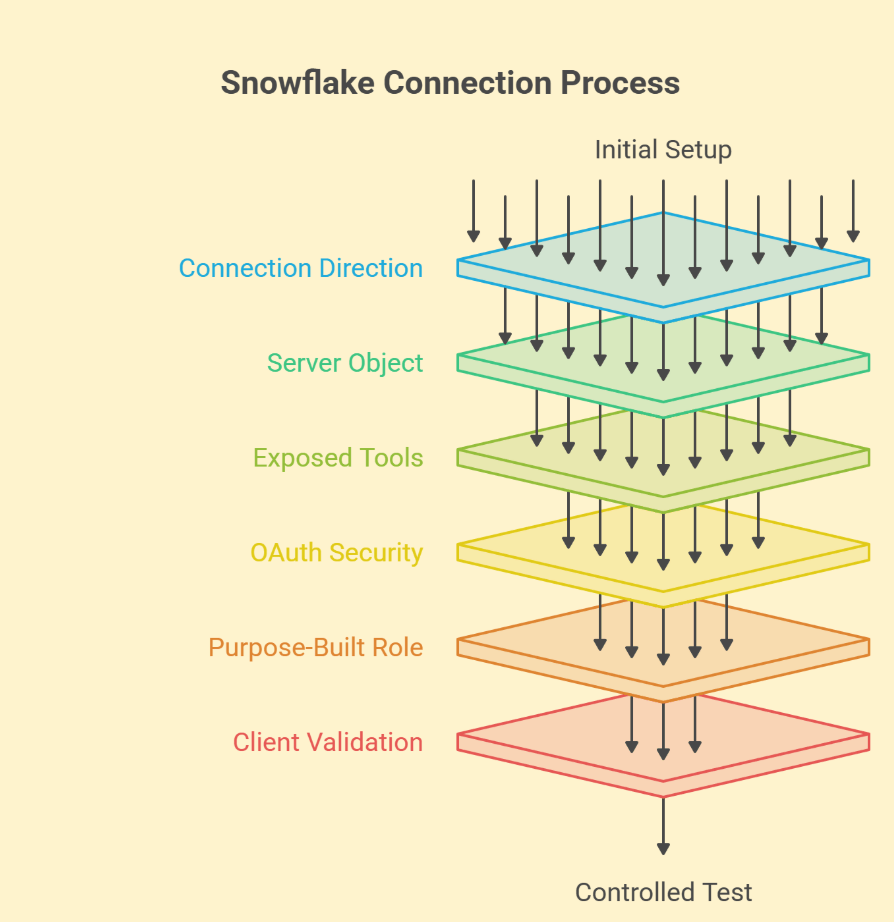
1. Configure the Snowflake managed MCP server
- Choose the direction: Pick a managed server when external AI clients need Snowflake tools. Pick outbound connectors when a Snowflake agent needs a tool hosted elsewhere.
- Create the server object: Select the database and schema that will hold the server. Write the specification, then run CREATE MCP SERVER under an authorized admin role.
- Choose the exposed tools: List only what the first workflow needs, each with a description that states its purpose. Settle the SYSTEM_EXECUTE_SQL question before any client connects.
- Configure OAuth: Create a Snowflake OAuth security integration that matches your client’s requirements. Store the client ID and secret securely, and confirm the redirect URI against the client’s supported flow.
- Grant scoped access: Create a purpose-built role and grant it USAGE on the server. Check that role’s privileges on each object a tool touches, such as a semantic view or Cortex Search service.
- Connect and validate: Add the endpoint to the client and sign in through the OAuth flow. Test read-only questions against expected answers, then check query history and credit use.
2. Choose the built-in Cortex tools
The managed server offers four tool types, and each maps to a different kind of request:
- CORTEX_ANALYST_MESSAGE: answers natural-language questions against a semantic view.
- CORTEX_SEARCH_SERVICE_QUERY: retrieves relevant passages from a Cortex Search service, which suits documents and support notes.
- CORTEX_AGENT_RUN: hands the request to a configured Cortex Agent.
- SYSTEM_EXECUTE_SQL: runs SQL with the full authority of the calling role (the one to think hardest about).
Write descriptions that separate similar-sounding questions. A request for recognized revenue should route to the approved semantic definition, and a guess built from billing columns is the failure to design against.
3. Set up outbound MCP connectors for Cortex Agents
Administrators create an external MCP server object that points to an API integration holding the OAuth credentials. Agent developers then add the connector to the agent specification and limit the tools that the workflow may call.
Where the connector supports it, end users sign in to the third-party service directly through CoWork. Jira and Salesforce are common destinations, and the Salesforce MCP article covers the CRM side of that pattern.
4. Connect Claude Code or Cursor to Snowflake
Add the managed server’s remote endpoint in the client’s MCP configuration, then complete its supported sign-in flow. Check your installed version first, because configuration examples vary between releases.
Programmatic Access Tokens (PATs) work for local development when the client accepts token configuration. Keep tokens out of committed project files, and test a permitted read before adding tools.
Settle credential ownership and incident handling before other teams reuse the server. The MCP server integration guide covers those production responsibilities in more depth.
MCP vs SQL API vs Snowpipe in Snowflake
Each path suits a different job. MCP fits an AI client that chooses among approved tools. The SQL API and Snowpipe serve systems that already know what to run or load.
| Operational Need | Likely Starting Point | Reason |
|---|---|---|
| An AI client picks an approved business action | MCP | The client reads tool descriptions and selects one |
| An application runs a known query on a schedule | Snowflake SQL API or a driver | The statement is fixed and easy to test |
| Source data lands in the warehouse continuously | Snowpipe or existing ELT | The pipeline was built for loading at volume |
1. Choose MCP when an agent selects the tool
The client reads each tool’s description and required inputs, then picks the one that fits the request. That flexibility suits open-ended business questions, and it trades away some predictability in what actually runs.
2. Choose the SQL API for a fixed application query
A dashboard refresh or scheduled export knows its statement in advance. The Snowflake SQL API or a JDBC driver runs that statement the same way every time, which keeps testing simple.
SQL-enabled tools can insert rows when the role allows it. That turns a natural-language request into a change to stored business data, so the capability belongs behind an approval step.
Challenges of MCP Integration With Snowflake and How to Solve Them
Unmonitored spending and wrong answers from incomplete semantic views cause the most damage in Snowflake MCP pilots. Five more challenges involve access and tool design, and the table pairs all seven with a fix.
| Challenge | Failure Point | Recommended Fix |
|---|---|---|
| 1. SQL execution scope | SYSTEM_EXECUTE_SQL runs with the calling role’s full authority. | Leave it out unless a named workflow needs it. Constrain the role and require approval for writes. |
| 2. Untracked cost growth | Warehouse and Cortex usage climb with zero connection errors. | Route agent SQL to a dedicated, monitored warehouse. Review usage by role weekly. |
| 3. Semantic view gaps | Cortex Analyst returns plausible answers built from the wrong columns. | Version the semantic view and test it against known-answer questions. |
| 4. Over-permissive roles | The agent reaches data outside the workflow’s approved scope. | Grant one purpose-built role per workflow and review it like production access. |
| 5. Tool sprawl | Overlapping descriptions send requests to the wrong tool. | Map each tool to one workflow. Separate read tools from write tools. |
| 6. Prompt injection | Free-text results carry instructions from outside the trust boundary. | Treat results as untrusted. Place a policy gate before any write-capable tool. |
| 7. Outgrown managed toolset | Business logic exceeds what the managed tools expose. | Move to a custom server only when justified, with a named owner. |
Also Read: Enterprise AI Adoption Challenges Explained: Data, Integration, ROI & Governance
How RTS Labs Helps With Snowflake MCP Integration
With RTS Labs, teams take one Snowflake MCP workflow into production and report two numbers leadership can check: answer accuracy and cost per completed task. The baseline comes first. AI automation consulting selects a workflow with a measurable outcome and ties it to the data required to support it.
- Cost control draws on real spend results. A global sports equipment manufacturer cut company-wide data spend by 25% through architecture and governance changes. Read the full case study here.
- Answer quality starts in the data model. On a live audio social platform, senior RTS Labs data scientists embedded across the client’s warehouse and delivered a reconciled revenue model. The same reconciliation happens before an agent gets access to a Snowflake semantic view.
Tool calls follow the agentic AI architecture pattern RTS Labs uses for enterprise agents. Landstar’s copilot paired document retrieval with live calls to its Shipment and Capacity APIs. Running inside a private Azure VNet, it reduced time spent searching by 90%.
Both results come from data and retrieval work outside Snowflake MCP, and both reflect the discipline an MCP build depends on. You also get controls your risk team can test, with AI governance consulting mapping them to SOC 2 or HIPAA where relevant.
Senior architects own the design and the release decision. Handover names who may change role grants and approve new tools, and the escalation path for cost or definition drift stays in scope after launch.
Since 2010, the firm has shipped 200+ projects with a 100% US-based team. Its AI integration services connect that delivery to the systems your business already runs.
A Decision Checklist for the Snowflake MCP Pilot
The pilot’s purpose and limits should fit on one page. Fill in these fields before anyone writes a server specification.
- Workflow: The repeated business question the connection answers
- Direction: Managed server or outbound connector
- Tools: The smallest set that answers the question
- Role: The purpose-built role that executes each tool
- Warehouse: The dedicated warehouse and its resource monitor
- Semantic view: The approved definitions and their version
- Known answers: The reference set used for testing
- Spend baseline: Expected credits and Cortex usage per task
- Writes: Read-only, or the approval gate for each write
- Owner: The person accountable after launch
Answer accuracy and cost per task make a strong pair of measures. Report them alongside the out-of-scope record tests, so the pilot proves a business result and a working access boundary at once.
Put MCP Integration With Snowflake Into Production With RTS Labs
Trust in a Snowflake MCP program builds one answered question at a time. Pick a question with an approved answer and a spending baseline, and let the results from that workflow decide what ships next.
RTS Labs can scope the architecture around your Snowflake environment and connected systems. Talk to an AI Expert to define the first workflow and its production acceptance criteria.
Frequently Asked Questions (FAQs)
1. Why does the client connect to Snowflake but show no tools?
Sign-in proves identity, and tool visibility depends on grants. Confirm the OAuth session runs under the role holding USAGE on the MCP server, and that the specification lists the tools you expect. Then check that role’s privileges on each underlying object, such as the semantic view.
2. Should production use OAuth or Programmatic Access Tokens?
OAuth suits production because each session ties back to an identity your team can review and revoke. PATs fit local development and quick tests. Where a PAT stays in use, restrict it to the workflow’s role with a short expiry, and keep it in a secrets manager.
3. Can one client conversation use multiple MCP servers?
Support depends on the host application’s ability to hold several server connections at once. Keep tool names distinct across servers and test ambiguous requests. Make sure the client keeps each connection’s authentication separate during a session.
4. How should teams handle breaking changes to tool contracts?
Version each contract and record changes to required inputs before updating a shared server. Give client owners representative tests and a migration window. Keep the previous contract live until affected applications pass controlled tests against its replacement.
5. What training do business users need before rollout?
Users need to tell retrieved evidence apart from generated interpretation. Show them examples of answers worth challenging, along with the route for requesting human review. Exercises built around the pilot workflow work best, and RTS Labs can design them.