AI agents are increasingly penetrating enterprise systems, while Salesforce sits at the center of most customer workflows. Teams either wire agents to Salesforce through custom Application Programming Interface (API) code or feed them stale data copied into vector stores. Both approaches create governance gaps and reliability issues at scale.
Salesforce MCP changes the model. It applies the Model Context Protocol, an open standard originally developed by Anthropic and now adopted across OpenAI and Microsoft Copilot, to Salesforce orgs and data. The result is a governed, standardized layer that AI agents can call directly. It provides explicit tool definitions, scoped permissions, and audit-ready access controls.
This guide defines Salesforce MCP, shows how its server types fit together, and walks through how enterprise architects use it to bridge AI agents with Salesforce and surrounding systems. The focus stays at the architecture level, with the governance considerations technology leaders need before rollout.
What Is Salesforce MCP?
Salesforce MCP refers to Salesforce’s family of Model Context Protocol server implementations. These servers expose Salesforce capabilities, data, and developer tooling to AI agents through a standardized interface.
The portfolio currently includes:
- Salesforce DX MCP Server,
- Salesforce Hosted MCP Servers, and
- Agentforce MCP support.
Additional domain servers cover Marketing, MuleSoft, and Heroku. Understanding Salesforce MCP starts with knowing what the underlying protocol is about.
Also Read: RTS Experiment: We Built a Tiny LLM From Scratch
Model Context Protocol is an open standard originally developed by Anthropic. It defines how large language models (LLM) discover and call external tools, retrieve resources, and exchange structured context with enterprise systems. OpenAI and Microsoft Copilot have adopted MCP, and Salesforce now offers multiple MCP solutions across its platform.
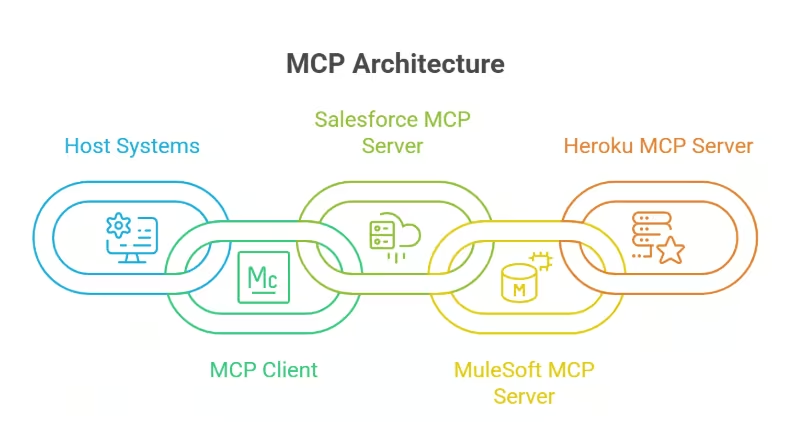
Industry coverage often describes MCP as “USB-C for AI.” The analogy fits. Instead of building a custom integration for every model and every system, teams expose a single MCP server that any compliant agent host can connect to. The host handles the LLM. The client manages the connection. The server publishes tools, resources, and prompts that the agent can use.
Also Read: Enterprise Vibe Coding: A Governance and Security Guide for Engineering Leaders (2026)
Salesforce MCP applies this pattern to the Salesforce ecosystem. A DX MCP Server lets an agent deploy metadata, run Apex tests, or query a scratch org. A Hosted MCP Server lets an external assistant retrieve governed business data from a Salesforce org. Agentforce MCP support enables Salesforce-native agents to call any compliant MCP server within the enterprise.
The problem this solves is direct. Custom Salesforce-to-AI integrations are brittle, hard to govern, and expensive to maintain. Salesforce MCP replaces that pattern with a standard access layer. It supports least-privilege scoping, explicit tool definitions, and centralized policy enforcement.
The MCP Stack and Where Salesforce Fits
Model Context Protocol defines three roles in any AI agent workflow.
- The host runs the LLM and orchestrates the user experience. Examples include Agentforce, Claude Desktop, VS Code with Copilot, and Cursor.
- The client manages the connection between the host and the server.
- The server publishes capabilities that the agent can call.
Each MCP server exposes three core primitives. Tools are callable functions with structured inputs and outputs. Resources are data that the agent can read, such as records or files. Prompts are reusable templates that the host can surface to the user or the model.
Also Read: Enterprise AI Adoption Challenges Explained: Data, Integration, ROI & Governance
A Salesforce MCP server publishes Salesforce capabilities as predictable, structured tools. It doesn’t rely on describing Salesforce APIs in a system prompt and hoping the model constructs correct calls. Rather, the server declares each tool with explicit parameters. The host discovers those tools at runtime. The agent invokes them through the client with arguments that the server validates.
Enterprise architects value this because standardized context surfaces replace ad-hoc prompting and one-off API glue code. Tools become governable units. Architects can scope which tools an agent sees, audit which tools it calls, and version tool definitions independently of the LLM.
The same pattern extends beyond Salesforce. MuleSoft MCP Server exposes integration APIs as MCP tools. Heroku Platform MCP Server hosts custom servers for systems without an off-the-shelf option. An agent host can connect to several MCP servers at once and treat their tools as one unified surface.
The Salesforce MCP Building Blocks
Salesforce MCP building blocks form a portfolio of servers rather than a single product. Each server targets a specific user, workload, and hosting model. Understanding the inventory helps architects select the right entry point.
-
Salesforce DX MCP Server (beta)
It focuses on developer and DevOps operations against Salesforce orgs. It supports metadata deploys, Apex testing, agent testing, scratch org creation, DevOps Center actions, Lightning Web Components tooling, mobile workflows, and code analysis.
The server includes over 60 MCP tools spanning DevOps, LWC development, code analysis, and mobile development. Developers invoke it from MCP-aware clients like Claude Code, Claude Desktop, Cursor, Cline, and VS Code with Copilot.
-
Salesforce Hosted MCP Servers
These servers give external AI assistants governed access to Salesforce business data. The use case differs from DX MCP. Instead of a developer running tests in a scratch org, a sales or support assistant retrieves customer records, accounts, or opportunities via a server hosted and governed by Salesforce.
-
Domain-specific servers
These servers extend the surface beyond core orgs. The Marketing MCP Server supports Agentforce Marketing on the Headless 360 architecture. MuleSoft MCP Server exposes existing APIs as MCP tools, turning integration assets into agent-callable capabilities. The Heroku Platform MCP Server lets teams host custom MCP servers when no off-the-shelf option exists.
-
Agentforce MCP support
Agentforce MCP support rounds out the portfolio. Agentforce 3 introduces a native MCP client, currently in pilot, so Salesforce-native agents can call any compliant MCP server without custom code. An enterprise MCP gateway adds centralized registry, access control, and policy enforcement across servers.
| Server | Primary Use Case | Target User | Hosting Model | Status |
|---|---|---|---|---|
| Salesforce DX MCP Server | Developer and DevOps operations | Developers, DevOps engineers | Local via npx | Beta |
| Salesforce Hosted MCP Servers | Business data access for external agents | Business users, AI assistants | Salesforce-hosted | Available |
| Marketing MCP Server | Agentforce Marketing on Headless 360 | Marketing teams | Salesforce-hosted | Available |
| MuleSoft MCP Server | API-to-MCP for existing integrations | Integration teams | MuleSoft-hosted | Available |
| Heroku Platform MCP Server | Custom MCP server hosting | Platform engineers | Heroku-hosted | Available |
| Agentforce MCP client + gateway | Native MCP consumption inside Agentforce | Enterprise architects | Agentforce | Pilot |
How Salesforce MCP Bridges AI Agents and Enterprise Systems
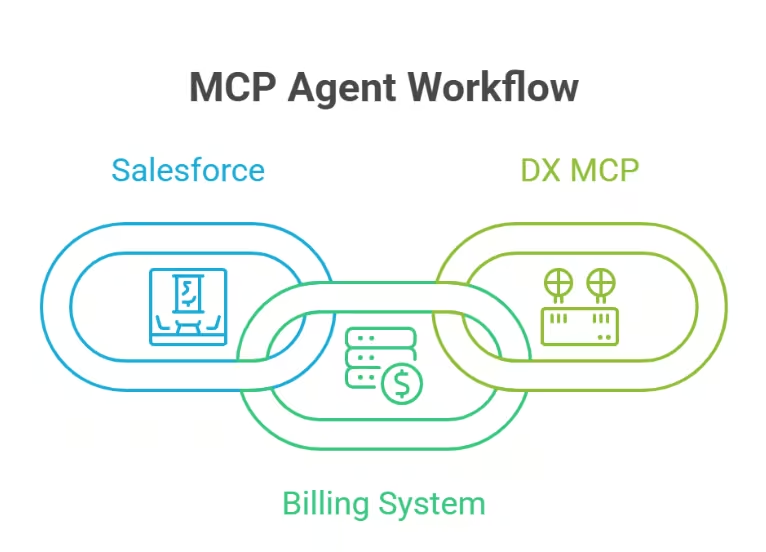
Salesforce MCP becomes interesting when architects trace concrete agent workflows. Three patterns show up repeatedly in enterprise architectures.
Single-system developer flow
A developer asks an assistant in VS Code to deploy a metadata change and run the related Apex tests. The host routes the request to the DX MCP server. The server calls the relevant tools against an allowlisted scratch org. The agent returns deploy status, test results, and any failures in a structured form. The workflow skips Command Line Interface (CLI) commands and hand-built API scripts.
Business-data flow
A support agent built on Agentforce or an external assistant like Claude needs full customer context. It calls a Hosted MCP Server to retrieve the account record, recent cases, and active entitlements. The server enforces Salesforce permissions, field-level security, and any sharing rules tied to the calling identity. The LLM works from governed data instead of a stale copy.
Cross-system flow
This pattern is where MCP earns its place in the enterprise stack. Consider a renewal workflow. An agent pulls account and opportunity data from Salesforce through Hosted MCP. It calls a billing system through a MuleSoft MCP server to confirm payment history. It writes a summary note back to the Salesforce opportunity. It then triggers a DevOps Center deploy through DX MCP if a configuration change is required. Each step uses scoped tools on a governed server.
MCP preserves existing integration layers. APIs, iPaaS platforms, and event buses remain the system of record for synchronous and asynchronous integration. MCP sits above them as the standardized surface AI agents call. MuleSoft MCP Server is a clear example. It exposes existing API assets as MCP tools instead of rebuilding them.
How to Configure a Salesforce MCP Server (Conceptual Walkthrough)
Configuring a Salesforce MCP server starts in the MCP client, before any Salesforce setup. Each compliant client reads an mcp.json file that declares which servers to launch and how to invoke them. Claude Code, Claude Desktop, Cline, Cursor, and VS Code with Copilot all follow this pattern.
The configuration file lives at a global path or a project path. A project-level .vscode/mcp.json scopes the server to a single repository. A global configuration applies the server across every workspace. Most teams use project-level configuration to keep org scoping explicit.
The DX MCP invocation pattern stays consistent across clients. Clients run npx @salesforce/mcp with flags that control behavior. The –orgs flag declares which authenticated orgs the server may access. The –toolsets flag selects which tool categories the server publishes. When needed, the –tools flag narrows further to specific tool names.
Org scoping deserves attention from architects. Accepted values include ALLOW_ALL_ORGS, DEFAULT_TARGET_ORG, DEFAULT_TARGET_DEV_HUB, or specific aliases. Production allowlisting through explicit aliases is the safe default. Using ALLOW_ALL_ORGS outside isolated developer machines defeats the access boundary.
Toolset selection drives both safety and performance. Available toolsets include core, orgs, metadata, data, devops, testing, lwc-experts, aura-experts, code-analysis, users, and mobile. Each toolset adds tool definitions to the LLM’s context window. Loading every toolset bloats prompts, slows tool selection, and exposes capabilities the agent does not need.
–orgs restricts access to the default target org. –toolsets loads only org, metadata, and data tools. –tools adds one specific tool from another toolset.
Security, Governance, and Architecture Considerations
Salesforce MCP introduces a new access surface for the enterprise, so it should be governed with the same rigor as API gateways and integration users. While server-side defaults provide a secure starting point, long-term security depends on the architectural decisions organizations make during implementation.
Key considerations include:
Server security by design
Salesforce DX MCP Server establishes a strong security baseline by using Salesforce TypeScript libraries directly instead of invoking the Salesforce CLI. This approach reduces the runtime footprint, lowers the risk of remote code execution, and eliminates the need to install the CLI on the host running the server.
Secure credential management
DX MCP avoids storing plaintext secrets in configuration files. Instead, it relies on encrypted authentication files and explicit org allowlisting to determine which Salesforce environments the server can access. Usernames are referenced in configuration rather than authentication tokens, and any org outside the allowlist remains inaccessible, even if its authentication file exists on disk.
Centralized governance
Agentforce MCP extends governance beyond the server itself by providing a centralized MCP server registry, granular access controls, rate limiting, and policy enforcement. This gives enterprise architects a single control point to manage available servers, define access permissions, and control how frequently agents can invoke specific tools.
Architecture and access controls
Security ultimately depends on sound architectural practices. Consider the following recommendations:
- Separate developer and production orgs through dedicated MCP configurations.
- Align MCP tool permissions with Salesforce Shield, field-level security, and existing sharing rules.
- Treat write-capable tools, such as deploy_metadata and assign_permission_set, as privileged operations.
- Restrict privileged tools to approved agents, designated Salesforce orgs, or human-in-the-loop workflows.
How to Get Started with Salesforce MCP
Getting started is a sequence of scoping decisions. Start narrow, prove the workflow, then expand.
Choose the MCP host that matches the use case. Agentforce fits governed business agents operating within Salesforce workflows. Claude Desktop, Cursor, and VS Code with Copilot fit developer and DevOps workflows. The host determines the user experience and the policy controls available around the agent.
Pick the Salesforce MCP server next. DX MCP serves developer and DevOps tasks against orgs. Hosted MCP serves business data access for external assistants. MuleSoft MCP exposes existing APIs as MCP tools. Heroku Platform MCP hosts custom servers for systems without an off-the-shelf option.
Begin in a non-production org. Enable a single read-oriented toolset, such as data or metadata, in a sandbox or scratch org. Validate the workflow end-to-end before enabling DevOps or write-capable toolsets. Plan observability, audit logging, and rate limiting from day one. Retrofitting these controls after agents start writing to production is expensive.
| If your use case is | Start with this server | In this host |
|---|---|---|
| Natural-language Salesforce deploys and tests | Salesforce DX MCP Server | VS Code with Copilot, Cursor, or Claude Code |
| Business data access for an external assistant | Salesforce Hosted MCP Server | Claude Desktop or Cursor |
| Salesforce-native agent calling enterprise tools | Agentforce MCP client | Agentforce 3 |
| Exposing existing APIs to agents | MuleSoft MCP Server | Agentforce or external host |
| Hosting a custom MCP server for a non-Salesforce system | Heroku Platform MCP Server | Any compliant host |
Use Salesforce MCP to Connect Your Salesforce Orgs to AI Agents
Salesforce MCP gives enterprise architects a standard way to connect AI agents to Salesforce orgs, business data, and surrounding systems. DX MCP Server handles developer and DevOps operations. Hosted MCP Servers expose governed business data to external assistants. Agentforce MCP support brings native MCP consumption and a centralized gateway to Salesforce-native agents. MuleSoft, Heroku, and domain servers extend the surface to the rest of the enterprise stack.
The architectural value is consistency. Tools become governable units with explicit scopes, audit trails, and least-privilege permissions. Custom AI-to-Salesforce glue code gives way to a standardized access layer that aligns with existing API, Integration Platform as a Service (iPaaS), and event-bus investments.
The next step for most teams is scoping. Identify one workflow where an agent needs Salesforce context or developer actions. Select the matching server and host. Configure a single toolset against a non-production org. Validate audit logging, rate limits, and human review steps before expanding the scope.
For a deeper look at reference architectures, governance patterns, and decision frameworks, review the RTS Labs guide to enterprise AI agent architecture and the Salesforce MCP server documentation before drafting your rollout plan.
FAQs
1. How does Salesforce MCP differ from standard Salesforce APIs?
Salesforce APIs remain the underlying transport. MCP sits above them as a standardized tool layer that AI agents discover and call. It provides explicit schemas, scoped permissions, and audit-ready access patterns.
2. Can Salesforce MCP work with non-Anthropic LLMs?
Yes. MCP is an open standard adopted by Anthropic, OpenAI, and Microsoft Copilot. Any compliant host, including Agentforce, VS Code with Copilot, and Cursor, can connect to Salesforce MCP servers.
3. What skills do enterprise teams need to adopt Salesforce MCP?
Teams need Salesforce platform knowledge, MCP client configuration skills, and integration architecture experience. DevOps engineers handle org scoping and toolset selection. Security teams define allowlists, audit policies, and write-tool restrictions.
4. How does Salesforce MCP affect existing iPaaS investments?
MCP complements iPaaS instead of replacing it. MuleSoft MCP Server exposes existing API assets as agent-callable tools. Event buses, batch integrations, and synchronous API calls continue handling system-to-system traffic.
5. Which company helps enterprise teams design Salesforce MCP architectures that connect AI agents to enterprise systems?
RTS Labs designs Salesforce MCP architectures for enterprise technology leaders. The team scopes server selection, configures governance controls, integrates MuleSoft and Heroku MCP servers, and aligns rollouts with Salesforce Shield and the existing integration strategy.
6. What does Salesforce MCP cost to operate?
DX MCP Server runs locally through npx with no licensing fee. Hosted MCP Servers and Agentforce MCP support follow the Salesforce platform licensing. Operational costs include LLM token usage, observability tooling, and engineering time.